Submission Access: Controlling Who Can View Completed Reports
Last updated: October 19, 2026
This article explains how to manage submission access settings in Xenia. You will learn how to control who can view checklist submissions and reports across different organizational levels.
Template Access Controls
Template Access controls checklist completion permissions, while Submission Access, a distinct setting, governs access to reports, including submissions, responses, and photos.
Navigate to Template
Click on any checklist to view.

Submission Access Purpose
Submission Access is a completely separate setting from Template Access. While Template Access controls who can complete a checklist, Submission Access controls who can view the completed data afterward — the submission reports, responses, and photos.
This distinction matters because:
A cashier might be able to submit a temperature log, but you don't want them browsing all temperature logs from the last 30 days
An HR manager needs to see all performance notice submissions, but only within their region
A district manager should see everything submitted from their stores, but not from other districts
Submission Access is where you configure all of this. It's found in the same place: Operations → Templates → [Template Name] → Settings → Access → Submission Access section

Tier 1 — View Own Submissions Only
Tier 1 — View Own Submissions Only
The user can only see submissions they personally completed
They cannot see submissions made by other users, even at the same location
Equivalent to: "I can only view my own history"
Best for: Frontline employees, basic store-level users who don't need visibility into others' work

Tier 2 — View Own + Submissions at Their Locations
Tier 2 — View Own + Submissions at Their Locations
The user sees their own submissions plus all other submissions where the submission location matches one of their member locations
Equivalent to: "I can see everything that happened at my store(s)"
Best for: Store managers who need to review what their whole team submitted, district managers who need to see all stores in their district
Important: This tier requires the template to include a "Select Location" step. Without it, Xenia can't determine which store a submission belongs to, and location-based filtering won't work correctly.
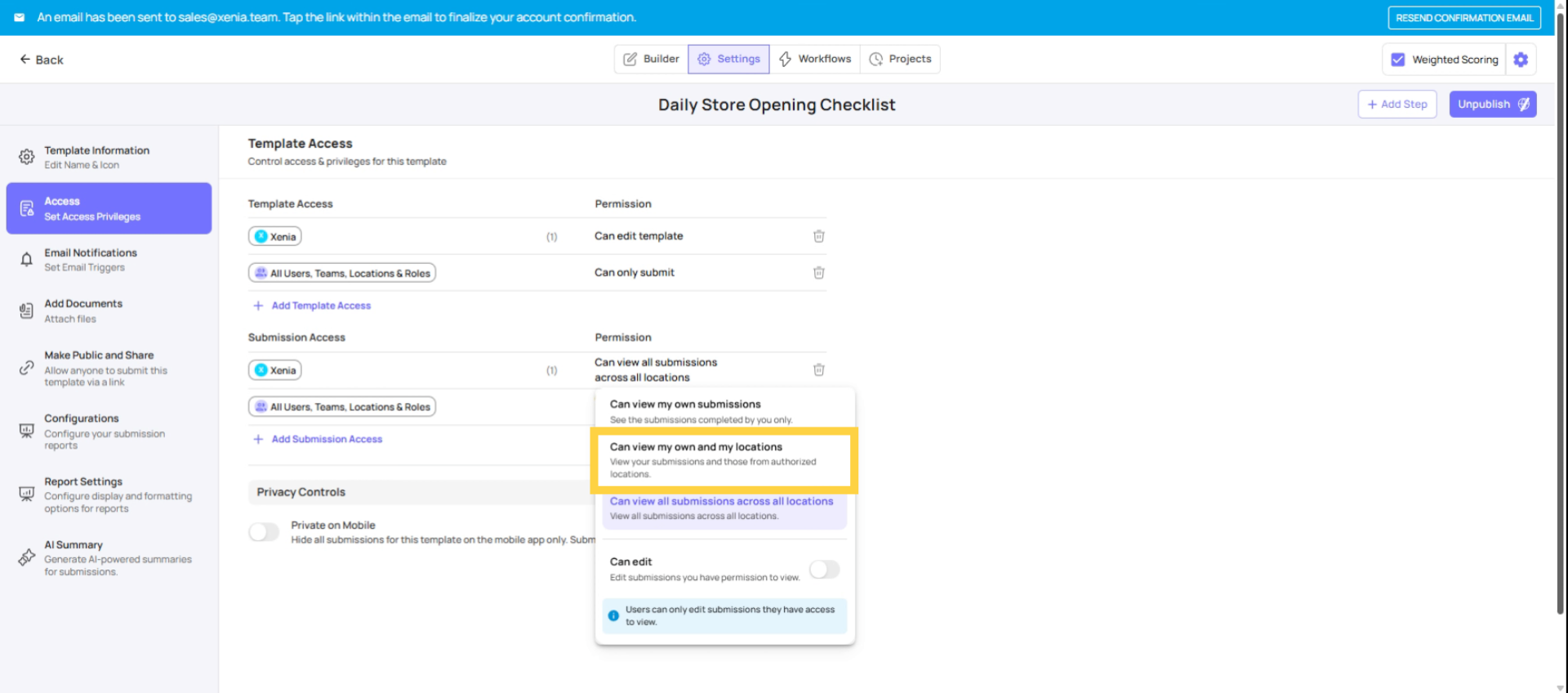
Tier 3 — View All Submissions
Tier 3 — View All Submissions
The user sees every submission for this template across the entire workspace, regardless of location
Equivalent to: "I can see everything, everywhere"
Best for: HR managers reviewing performance notices across all locations, QA/Compliance roles reviewing audit data org-wide, Admin/Owner level roles

Template-Level Location Step
For Tier 2 (View own + at their locations) to work correctly, the template must include a "Select Location" step (a step type that lets the user indicate which location they're submitting from).
When a submission is made, Xenia tags it to the selected location. When a store manager views submissions, Xenia checks which of those tagged locations match the manager's location membership. Without the location step, submissions aren't tagged to any location, and the location-based filtering can't work.
If you're configuring Tier 2 for store managers or district managers, always verify the template has a Location step — and that it's positioned near the top of the checklist.

Configure Role-Based Submission Access
Configure submission access role by role based on who actually needs to see historical data for each checklist.

Common Submission Access Configurations
Template | Frontline Role | Store Manager | District Manager | HR / Admin |
Daily Opening Checklist | View own only | View at their locations | View at their locations | View all |
Temperature Log | View own only | View at their locations | View at their locations | View all |
Performance Notice | — (cannot submit) | View own only | View at their locations | View all |
Food Safety Audit | — (cannot submit) | — (cannot submit) | View at their locations | View all |
Incident Report | View own only | View at their locations | View at their locations | View a |
This article explained how to configure submission access tiers and template permissions in Xenia to control who can view checklist submissions at various organizational levels. For more information, see related articles on template management and user roles.
Need Help?
Reach out to our support team at support@xenia.team