Conditional Visibility for Location-Specific Checklists Using a Single Template
Last updated: October 19, 2026
🔎 Overview
Conditional Visibility in Xenia allows you to create one master checklist template and automatically show or hide checklist sections or steps based on:
The selected Location for the submission
Selected responses inside the submission
This feature ensures that teams across multiple locations see only what applies to them, preventing overlap, confusion, or incorrect inputs.
🛠 Step-by-Step Instructions
Here's the step by step guide below to configure Conditional Visibility:
1️⃣ Create or Open a Template
Go to Templates
Select Create New Template or open an existing one
Add the sections you want to customize
2️⃣ Configure Conditional Visibility (Location-based)
To show a section only for specific locations:
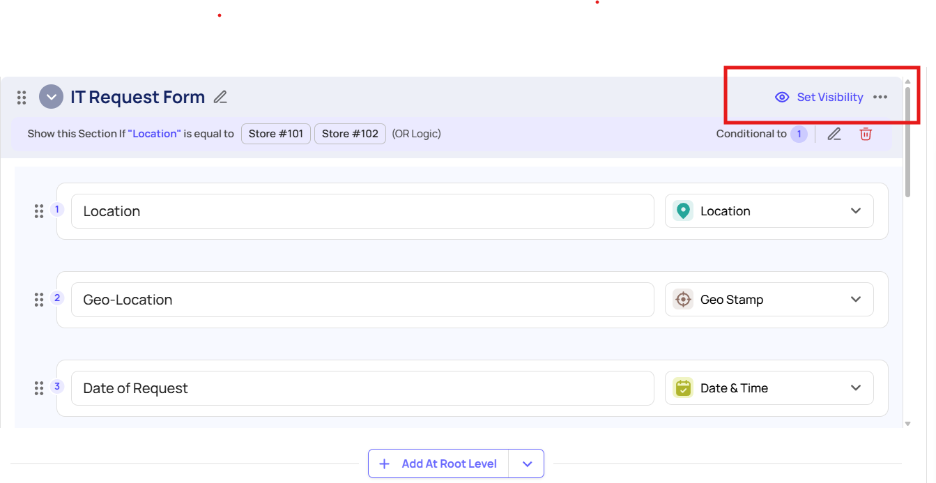
Click the option “set visibility” on the top right of a section.
Select Conditional Visibility
Choose Location
Check the locations where this section should appear
Save
✔ Staff at those locations will now see only the relevant sections.
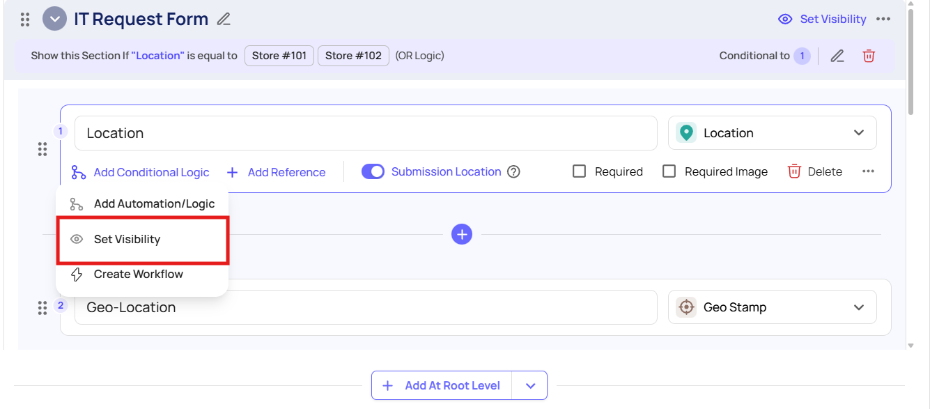
Tip: You have the flexibility to apply conditional visibility to individual sections as well as to each specific step within a section.
3️⃣ Configure Conditional Visibility (Response-based)
This allows a question to unlock a hidden section or hidden question based on a response.
Steps:
Add a multiple-choice or yes/no question
Click Conditional Visibility on the section you want to reveal
Select Response
Choose the triggering answer
Save
📲 Mobile App Behaviour
On mobile, users will only see the sections that apply to them:
Based on their location assignment
Based on triggered responses
This keeps the experience clean, fast, and error-free.
🎯 Benefits
Reduce duplicate templates
Prevent staff from entering data for the wrong location
Provide tailored workflows per site
Minimize operational errors
Maintain clean, accurate reporting
📂 When to Use Conditional Visibility
Use this feature when:
You run multiple locations with different processes
Only some locations have bars, patios, drive-thru, or equipment
You want a single checklist but different teams need different sections
You want to assign location-based audits or inspections
📦 Use Cases
🍔 Restaurants
Bar checklist shown only for stores with bars
Patio pre-shift shown only for locations with patios
🏪 Convenience Stores
Fuel pump inspections only shown for fuel-enabled locations
Lottery reconciliation shown only for certified stores
🏢 Facility Management
Equipment steps shown only in buildings that have those assets
👩💼 HR / Admin
On-boarding tasks shown only for departments that require them
🧰 Troubleshooting
❗ Section not showing for users?
Check if the user is selected the correct location
Verify the section has correct visibility conditions
Ensure no conflicting rules block it
❗ Location group not populating?
This is a known issue. Use individual locations until engineering updates group selection.
❗ Response-triggered visibility not working?
Confirm the triggering question is above the hidden section
Ensure the question is required.
Need Help?
For technical support or setup assistance, contact us at:
support@xenia.team